Stats

7.8.14

Book Recommendation: The Race Underground: Boston, New York, and the Incredible Rivalry That Built America's First Subway

Readable books about engineering topics are few and far between. Some of my favorites include:

  •  The Existential Pleasures of Engineering, as well as other books by Samuel C. Florman that encourage engineer types to think and be well-rounded.
  • Devil in White City, by Erik Larsen - this one's focus was the Chicago World's Fair and a serial killer, but in my mind the hero is the structural engineer who invented the Ferris wheel
  • Inviting Disaster, by James R. Chiles - the book that inspired Engineering Disasters on The History Channel. I confess that I'm a bit of a sucker for a good structural collapse (assuming no one gets hurt, of course).

I saw a review for The Race Underground, by Doug Most, in Boston Magazine while was on a recent trip to the Autodesk office in Waltham, MA. This book is about the history of urban transportation in Boston and New York, with interesting offshoots into London and Paris. The publisher's summary oversells the concept that the Whitney brothers' rivalry fueled the development of the subways of their respective cities. When you get into it, there was little rivalry and more two guys that happened to be in the right places at the right time when electricity, need and money came together to make a subway happen. Another misnomer is the concept of a "race." Nothing about these projects happened quickly. It took enormous will and money to overcome the fear, uncertainty, and doubt.

My favorite bit was about William Barclay Parsons' involvement with New York City's subway. He and Henry Steinway (yeah, the piano guy) designed the first few tunnels of what is now the IRT line of the New York subway system. Parsons went on to found Parson's Brinckerhoff  and became *THE GUY* to dig tunnels all over the world. What tickled me about his story is that at age 32 he was considered nearly too young to be heading up a project as large as the New York subway tunnels.


Gotta love civil engineering - the only field where being over 30 can still be considered young.

It does get a bit dry and protracted in parts, but overall a worthy read. 

1.8.14

SCCM: Advanced Deployment Tools for Autodesk Products

SCCM (or System Center Configuration Manager) is a Microsoft tool for deploying products and managing systems from a central location. Many organizations use this product for doing everything from distributing software to tweaking the registry to managing security updates. There are similar tools by competitors to Microsoft of course, the most common ones I bump into are Alteris, Zenworks and LANdesk to name a few, but Microsoft SCCM seems to rule the roost.

Autodesk products deploy nicely with SCCM, and full instructions on how to do this can be found here.

Depending on the task you are trying to perform with SCCM, you may need product ID numbers. These are the crazy-looking alpha-numeric codes used by Windows to uniquely identify installer and uninstaller resources. You can find these codes after a deployment is created in the text files located in the SMS_SCCM Scripts folder.

If you are trying to create a fancier script than what Autodesk deployments make for you, it can be tedious to gather the information from each product, add-on and service pack. I found a tool that will provide these numbers for any product MSI file. This is not an Autodesk tool, a colleague pointed me to it in an IT forum.

I've tested it to verify that it works and does not do anything harmful to the files.

The link will take you to a zip of a VB script. Extract the VB script to a convenient location, such as the desktop.  Drag and drop any MSI file onto the VBS icon.  The result will be a text file (automatically saved to the same directory as the MSI) that shows the product code at the bottom.

https://autodesk.box.com/s/rm8g4khm2wq50akf0huo 

Odds are, you have no idea what I'm talking about. Count yourself lucky! For those of you have been hoping to find a published list of product ID numbers - this tool is even better.

Happy Friday.

26.7.14

Mastering Civil 3D 2014

A few people have told me that the files for the Mastering Civil 3D 2014 Quickstart is missing from the Wiley download. Here is an alternate download link: http://lnkd.in/btc5r8X

oh you need the book you say? 
Buy it here:

24.5.14

Back to the Software: AutoCAD Command Line Shortcut Cheat Sheet

The shortcuts listed in this graphic are all out of the box.  You can always change or customize them by modifying the acad.pgp file.  The easiest way to make the edits is from the Express Tools tab > Tools panel > Command Aliases. The Command Aliases tool is an interface that modifies the PGP.  You can always modify the PGP file manually by opening it in Notepad.  

By default, the PGP is located in...
 C:\Users\-user login-\appdata\roaming\autodesk\-Autodesk software version-\enu\support\acad.pgp


23.5.14

Note to Hippies: Make Love, Not Roads

This post has gotten a frightening number of hits in the last few days (over 500). I've decided to clean it up a tad and clarify a few points. The intent of this post was to point out issues that I did not find adequately addressed in either the solarroadways.com website or the Indygogo page.  Photovoltaics have a place in energy production - just not under the tires of an 18-wheeler. 

What follows is strictly my opinion.


My buddy posted this on Facebook today and I'm pretty sure I'm like one more pedantic comment away from getting "unfriended."
Source: http://solarroadways.com/intro.shtml
"Solar roads? Where do I even start with this?!"

At first glance it seems like a no-brainer, right? In general, I am a huge fan of solar energy. A big area that is static and often empty could easily be filled with PV panels.

The world needs dreamers to push technology forward and challenge innovation. All due respect to Scott and Julie Brusaw, I see many problems with this concept.

Problem 1:  Solar energy needs a smooth, clean surface for optimal efficiency. Roads get really really dirty. Dust, tire schmutz, oil and smeared raccoon carcasses cloud the issue.

Problem 2: Speaking of clouding the issue, think about the glass. The same roughening they used to make the stuff non-ice-rink-like also impedes sunlight from hitting the PV cells.  Additionally, they are talking about using recycled glass. Recycled glass contains impurities that would also impede efficiency.  Even if the recycled glass were purified they should not use mixed color glass. Also, to make it nice and thick for load bearing - again, less light hits the cells.

Problem 3: References, please? I couldn't help but notice that none of the magazines where this was featured are scholarly or civil engineering related. The FWHA funds a lot of wacky stuff in phase 1 so that is not an indication of feasibility. I want to see the university studies. I want to see the Booz Allen Hamilton data*. I want to see a serious article in ENR or ASCE Journal.

Problem 4:  Want to get a snowplow driver excited? Ask him his opinion on embedded reflectors. He will probably curse up a storm and tell you stories of damaged plowblades or laugh and tell you how he pulled up 10 miles of reflectors in the blizzard of 2011. The reason is that it doesn't take much for mother nature to push up a little corner of a modular object (known as frost heaving), therefore making it non-flush with the road surface. Expand this headache to every square hexagon of roadway, and you see this is going to be an issue.

Problem 5: Drainage, in my opinion, is one of the biggest problems. Note that all of the prototypes are planar surfaces with a trench on either side. Supposedly, one trench is for electrical and data and the other is for storm water. The geometry of one of today's roads is such that water drains to both sides. They are going to need to re-think the shape of the modules to accommodate for changing crown conditions. Either the cross-section of the road will need to change or they are going to need water-proof channels for electrical components. A good way to get around this problem is to put the stuff overhead, which they say is unsightly. Also, nobody treats highway runoff.

Problem 6: This technology does not preclude potholes. The cause of a pothole is usually the sub-base getting washed out by water or that pesky frost heave I mentioned earlier. You'll still get potholes and some county worker is going to level it out by throwing a scoop of asphalt on top of the panel.

I know I'm being totally pessimistic but I will run down one of these for its entire length butt nekkid if I ever see one installed.

*Booz Allen Hamilton is the engineering research firm that contacted the Brusaws about conducting feasibility studies. No data has been made available to the public (that I could find).

8.5.14

The Scourge of the Educational Plot Stamp is No More

Disclaimer: I am not a legal representative for Autodesk. For all questions regarding license compliance, check out this website or refer to your product's EULA. 

Autodesk provides educational versions of its software at reduced rates (often free!) so that students, teachers and other non-commercial entities can learn without worrying about trial licenses expiring.

Educational software is strictly intended for non-profit generating activities. Files generated with educational versions have an embedded flag that the software can detect. When you plot from these files, "Produced by an Autodesk Educational Product" will appear on the output.

However, students often become interns and interns have access to companies that have traditional paid licenses. If the student decides to work on a file at school or insert that really cool tree block he created for his midterm project - BAM - you're polluted. I truly believe that the vast majority of plot stamp issues are due to innocent accidents rather than nefarious intent.

Working with these files in a production environment is a bad idea. Do you remember the pink spots in The Cat in the Hat Comes Back? Every time the Cat and his buddies try to clean the pink stain, they only succeed in spreading it further, until the whole house and yard are covered in pink spots. The educational plot stamp is a lot like that. Once a file has it, it will cause any file it touches to have the plot stamp!

Things that will cause the education flag to spread:
  1. Any file created or edited by an educational version of the software
  2. Or contains a block edited or inserted from an educational version
  3. Or Has/had an xref from an educational version.


In the past, it was darn near impossible to remove the plot stamp. For a short window of time, if you aligned the correct forces (something like: your reseller, no fewer than two Shamen, a blood sacrifice, and a gross of rubber chickens - but don't quote me on it) you could remove the plot stamp with a one-time-use tool from Autodesk. When that got the kebash, your only option was to recreate the file from DXF.

Ugh. Damn interns!

If you receive files from a contractor that contain the education flag, the contractor is in violation of the end user license agreement (EULA).  It is completely within your right to decline acceptance the files (which I recommend). Odds are, the other company is unaware that the drawing has been polluted with the educational flag.

Lately, the behavior of AutoCAD when it detects educational files has changed dramatically.

The good news is that as of AutoCAD 2014 sp1 (and related vertical products), the educational plot stamp is noted (see above dialog box image) but not plotted (yay!). AutoCAD 2015 will not only ignore the educational plot stamp, it can remove it!

If you need to work on an AutoCAD file in a previous version of the software, you can save it in AutoCAD 2015 (or TrueView 2015) and save it back down to the version you wish to work in.

Here’s the updated Technical Solution for the educational plot stamp, including new 2015 functionality (plot stamp removal).

http://knowledge.autodesk.com/support/autocad/troubleshooting/caas/sfdcarticles/sfdcarticles/Educational-Plot-Stamp-Removal-Issues.html

Other than a few out-of-work Shaman types, most people are very happy about this change. As long as you are running legit, full licenses of 2015 Autodesk products you no longer have to worry about the unwanted plot stamp.  If you think the company who sent you the education file is using the software in a shady way, you can always narc on them to our license compliance folks.

-LGH

17.3.14

The Secret Lives of Files

Here is a fun, broad-scope trick that can help you troubleshoot problem files*.
Rename the file so that it ends with .ZIP.
I've used this trick on:
  • DWF (Autodesk's design web format)
  • PKT (Civil 3D subassembly file)
  • DOC (Microsoft Word file)
  • XLS (Microsoft Exel)
This trick allows you to look into the guts of a file*. If the file type allows it, you will see folders and XML pointer files. It probably works on formats that are not listed above, but I have not had the occasion to hack into others. (Note that this does not work on DWG files.)

Windows likes to assume we are all dumb, so when the warning message pops up about changing the extension, just click yes.

When would one do this?

Renaming the file to ZIP can be a troubleshooting tool. For example, I once had a customer with a DWF that wouldn't open.  The easiest thing would have been to plot a new one, but we did not have the original file to do so.  So, I renamed it to zip in order to see what it was missing. The manifest.XML told me what should be there, so we were able to cobble together enough of it to get it to open.

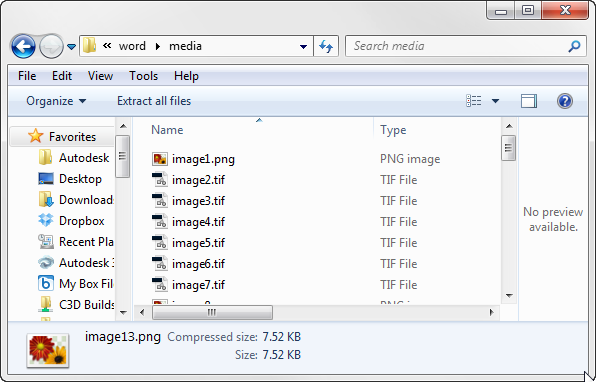
The slickest use of this tool is for recovery. Renaming a Word doc to ZIP will allow you to see text, and images in their raw form. The following image shows the guts of a renamed word document.


Inside the word folder you will find even more folders and a bunch of XML files.  All of the images are packed together in the Word > Media folder. You'll notice that all of the images are renamed based on the order in which they appear in the document.

 The text of the document is stored in document.xml file that is in the Word folder. Granted, the formatting is whack, but if this is your corrupt master's thesis or greatest novel of your generation that won't open, it's way better than retyping.

Now let's talk subassembly composer PKT files.

A PKT file is really a package of the following:

  • ATC: an XML based file that lists the parameter names and default values. 
  • CFG: A tiny little version flag
  • DLL: The real guts of the subassembly - this is the compiled result of your efforts in sub-assembly composer (SAC), or Visual studio (if you're a stud)
  • EMD: more parameters and codes
  • PVD: preview values
  • XAML: shape, point and links codes as well as data type definitions. 
You might also see:
  • XML: This file will only be present if you created the PKT with SAC. 
  • PNG (or other image format): Thumbnail image of your subassembly as defined in subassembly composer
  • HTM: Help file, if it was created and defined in subassembly composer 


There are two reasons this trick is on my mind, especially with regard to PKT files.  In one tech support case, a client had uploaded all of the individual files (ATC, DLL, CFG, etc). The person who initially responded made his own PKT from the files simply by zipping up the individual pieces and renaming.

In another case, a user emailed a PKT file to a coworker but the PKT would not work on the receiving end. After renaming it to zip and looking at the result, it turns out that an aggressive anti-virus program stripped out the DLL; a triumph in IT security, but not so great if you are trying to build a corridor. They transferred the file using FTP and bypassed the anti-virus.

Use this trick in good health. Don't forget to name ZIP files back to their original extension so they will open in the intended application.

*Make a backup first! I am not responsible for corrupt files. Use this trick at your own risk, blah blah blah.